It has been a busy few weeks on JMeterHub. Since the last release post, the analyzer gained four upgrades that came straight from the questions performance testers ask after every load run: how many transactions actually failed?, did we meet our SLA?, how do I share this? and why is my PDF missing columns?
Here is what is new.
Passed / failed transactions, at a glance
The aggregate table tells you about response times, but the first question in most test reviews is simpler: did it pass?
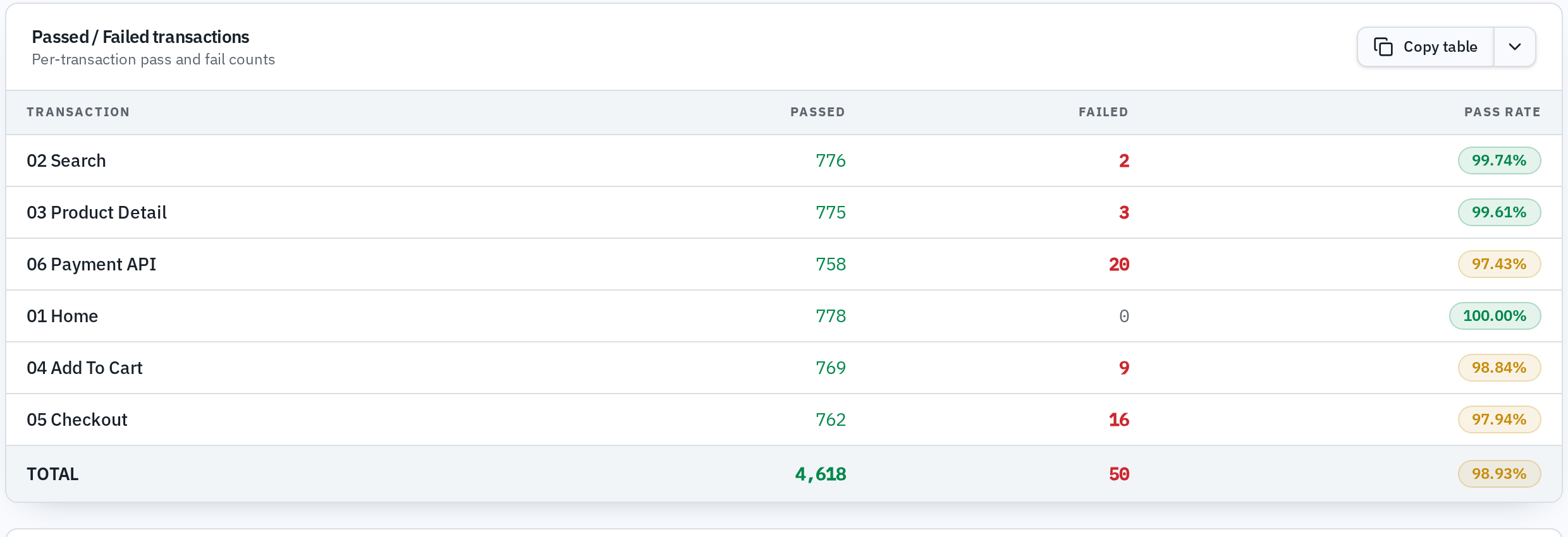
The analyzer now shows a dedicated Passed / Failed Transactions table under the aggregate report. For every transaction you get:
- the number of passed and failed samples,
- a color-coded pass-rate badge: green at 99% or above, amber at 95% or above, red below that,
- failed counts highlighted in red when anything failed,
- a TOTAL row that sums the whole run.
The same table is included in the copy-as formats and in the PDF export, so the numbers survive when you paste them into your test report.
SLA targets: turn numbers into pass/fail calls
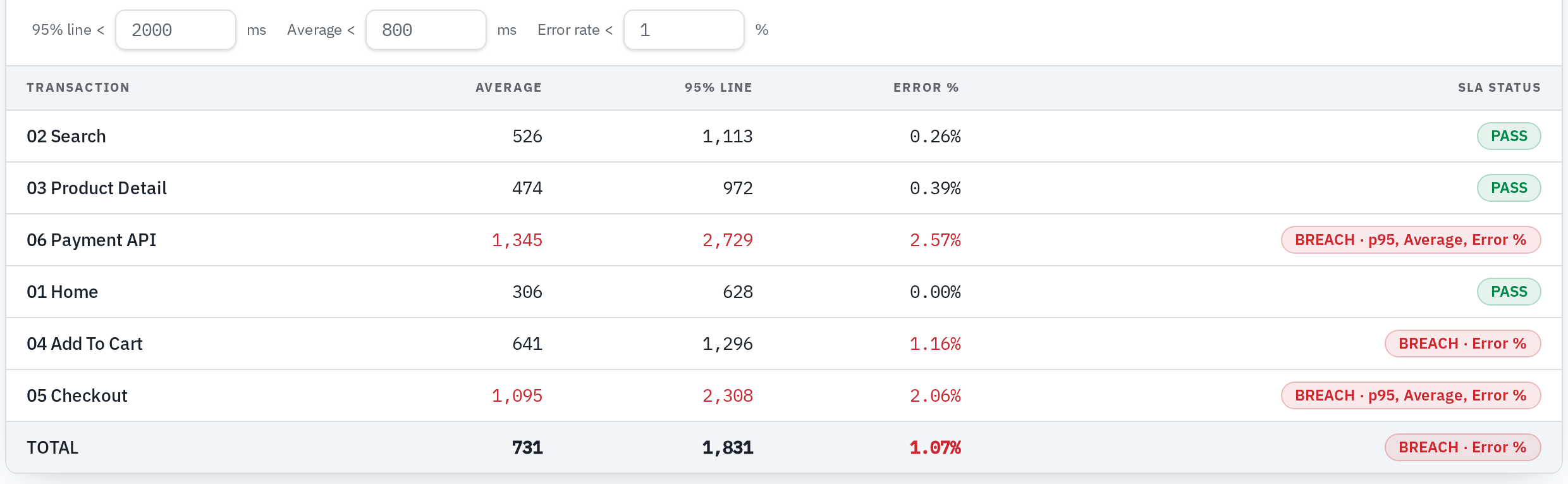
If your project defines response-time targets — "p95 under 1500 ms for checkout", "average under 300 ms for search" — you no longer have to eyeball the aggregate table against a spreadsheet.
The new SLA panel lets you set a target per transaction (or a global default), and it immediately tells you which transactions meet the target and which break it, based on the metric you choose. In the PDF report there is a dedicated SLA section, so your exported report answers the executive question "did we meet the SLA?" without any manual work.
This one is free, like everything that runs in your browser during a session.
Shareable report links (Pro)
A load-test result is only useful if the right people see it. Pro users can now turn any saved analysis into a read-only share link. Anyone with the link can open the full report — charts, aggregate table, passed/failed breakdown, SLA section — in their browser, without signing up and without an account.
The link shows only what you explicitly shared, and you can switch sharing off at any time from the dashboard. The underlying analysis stays private otherwise.
A PDF report that does not clip your columns
One of the most reported issues: in the exported PDF, long JMeter transaction names (hello, Checkout — POST /api/v2/orders with coupon SALE2026 (100 users)) pushed the metric columns out of the page.
The PDF is now landscape A4 with a fixed layout: transaction labels wrap onto multiple lines while every numeric column stays readable. Combined with the new passed/failed and SLA sections, the exported report now covers everything the on-screen analyzer shows.
Also on the page
A few smaller improvements you may notice:
- a polished results dashboard with clearer KPI cards and severity-colored bars for the slowest transactions,
- an interactive demo in the hero so you can see the analyzer before uploading anything,
- contextual hints in the analyzer that explain what Pro unlocks at the moment it becomes relevant.
The early adopter offer is still open
Until November 27, 2026, signing up gets you JMeterHub Pro free for life: unlimited saved analyses, shareable report links and AI conclusions — not a trial that quietly expires.
If you have been waiting for the tool to be "complete enough", the passed/failed table, the SLA validator and shareable links are exactly the pieces testers asked for. Try them with your next run:
Open the analyzer → · Read about the early adopter offer →
As always, JMeterHub parses your .jtl files entirely in your browser. Nothing is uploaded, nothing is stored on our side for free-tier analysis — the privacy proof recording on the home page shows the network tab staying silent while a file is analysed.
Questions or feedback? The comment section on our community posts is open, or write to hello@jmeterhub.com.